
Your pay schedule from your last cheque
Enter how often you’re paid and your last payday, and Paycheq works out your whole pay schedule.
What to enter
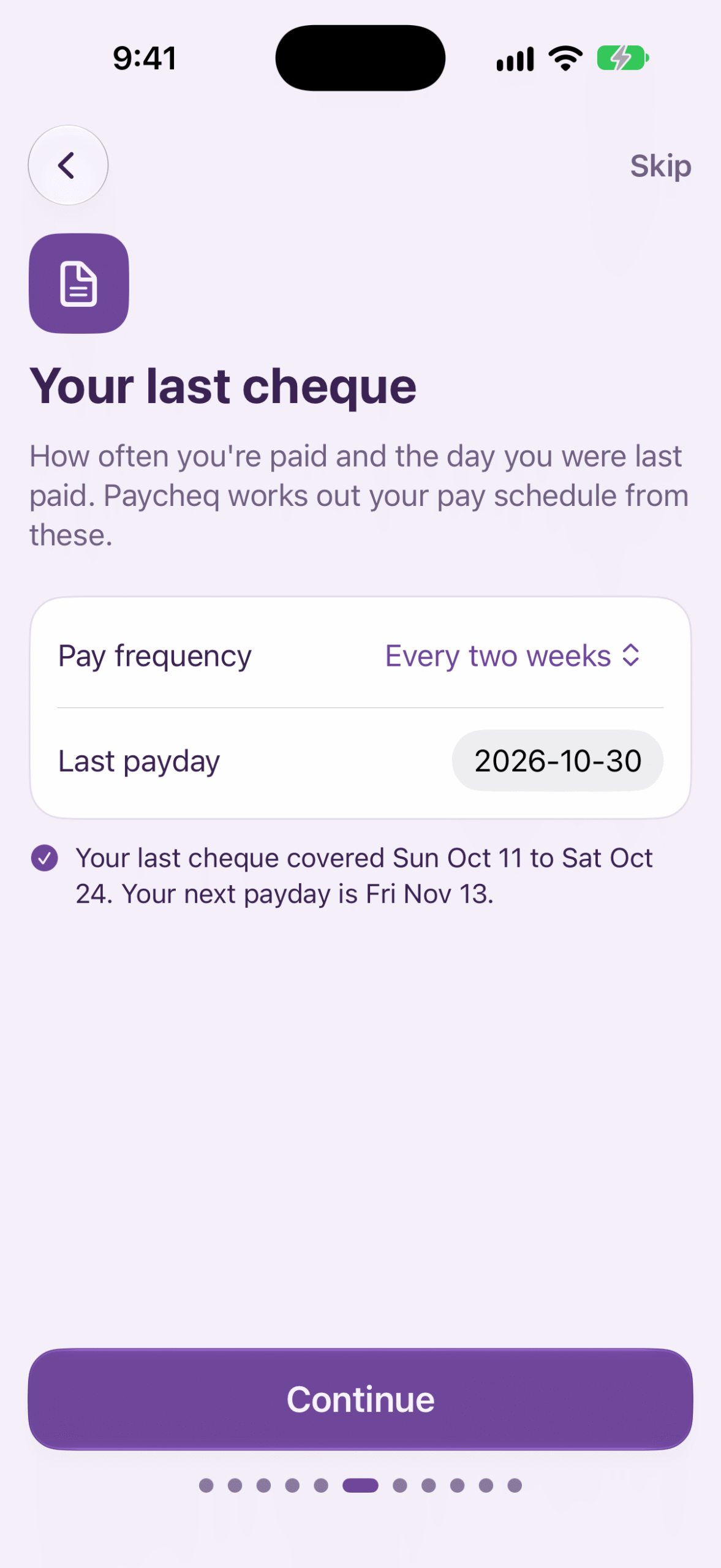
During setup, the Your last cheque screen asks for two things:
- Pay frequency: weekly, every two weeks, twice a month or monthly.
- Last payday: the date of your most recent cheque.
Under them, Paycheq shows what it worked out, for example: “Your last cheque covered Sun Oct 18 to Sat Oct 31. Your next payday is Fri Nov 20.” Check that it matches your pay stub, then tap Continue.
How Paycheq works it out
A cheque pays the last pay period that ended on or before payday.
- Weekly and every two weeks: pay periods run Sunday to Saturday, so a period ends on the Saturday on or before payday.
- Twice a month: periods run from the 1st to the 15th, and from the 16th to the end of the month.
- Monthly: periods are calendar months.
Example: paid every two weeks, with a last payday of Friday, Nov 6. The cheque covers Sunday, Oct 18 to Saturday, Oct 31. The next payday is Friday, Nov 20.
Changing your pay schedule later
- Go to Jobs and tap your job.
- Under Pay schedule, set Pay frequency and Last payday.
- Tap Save.
Under Pay schedule, Paycheq shows the days your last cheque covered and your next payday.
If that doesn’t match your stub, change A pay period started on or Paid _ days after a period ends in the same place. Setup fills these in for you, so you only need them if your pay periods start on a day other than Sunday, or your cheque pays an earlier period.
Good to know
- Twice-a-month and monthly paydays stay the same number of days after a period ends, so they can land a day or two differently from your real payday.
- The payday you enter is also used as the date for your union dues and year-to-date amounts, so you don’t type it twice.
- Next in Getting Started →Setting up your first job
- Next in Getting Started →Your pay schedule from your last cheque
- Next in Getting Started →Clocking in and out
- Next in Getting Started →Entering a shift by hand
- Next in Getting Started →Reading the Week screen
- Next in Getting Started →Clock-in and clock-out reminders
- Next in Getting Started →Working more than one job
- Next in Getting Started →Your widget and Live Activity
- Next in Getting Started →Checking your first cheque
- Next in Your pay →Reading the Pay screen
- Next in Your pay →Why your estimate can differ from your cheque
- Next in Your pay →Entering a cheque stub
- Next in Your pay →CPP and EI and the yearly maximums
- Next in Your pay →Adding pay from before you started using Paycheq
- Next in Your pay →Vacation pay
- Next in Your pay →Exporting shifts and pay summaries
- Next in Overtime and rates →The overtime window (such as midnight to 6 a.m.)
- Next in Overtime and rates →Saturday, Sunday and other day rates
- Next in Overtime and rates →Daily and weekly overtime
- Next in Overtime and rates →Shifts entered at 1.5× or 2×
- Next in Overtime and rates →The rate highlighted on the Clock card
- Next in Overtime and rates →Other rates, such as a lead rate
- Next in Overtime and rates →Raises and retro pay
- Next in Union contracts & custom rules →Setting up your contract rules
- Next in Union contracts & custom rules →The long-shift meal premium
- Next in Union contracts & custom rules →Call-out minimums
- Next in Union contracts & custom rules →How does banked time work?
- Next in Union contracts & custom rules →When more than one rule applies
- Next in Union contracts & custom rules →Working two rates in one shift
- Next in Union contracts & custom rules →Paid breaks and unpaid meal breaks
- Next in Union contracts & custom rules →Shift premiums and on-call pay
- Next in Holidays →How holiday pay works
- Next in Holidays →Your contract's own holidays
- Next in Holidays →How do my two vacation balances work?
- Next in Holidays →Holidays in Alberta
- Next in Holidays →Holidays in British Columbia
- Next in Holidays →Holidays in Manitoba
- Next in Holidays →Holidays in New Brunswick
- Next in Holidays →Holidays in Newfoundland and Labrador
- Next in Holidays →Holidays in the Northwest Territories
- Next in Holidays →Holidays in Nova Scotia
- Next in Holidays →Holidays in Nunavut
- Next in Holidays →Holidays in Ontario
- Next in Holidays →Holidays in Prince Edward Island
- Next in Holidays →Holidays in Saskatchewan
- Next in Holidays →Holidays in Yukon
- Next in Holidays →Holidays in the federal sector
- Next in Your data →Backing up and restoring
- Next in Your data →Using a flat tax percentage
- Next in Your data →Union dues
- Next in Your data →How Paycheq estimates tax
- Next in Your data →TD1 claim amounts
- Next in Your data →Your data stays on your phone
- Next in Paycheq Pro →What Paycheq Pro adds
- Next in Paycheq Pro →Restoring a purchase
- Next in Paycheq Pro →If your Pro subscription ends
- Next in Troubleshooting →My figures don't match my cheque
- Next in Troubleshooting →A backup won't restore