
The pay tracker for Canadian hourly and shift workers
Know what your cheque should be before payday.
Paycheq works out every shift by how you're actually paid: your province's labour law, or custom rules you set up for your job. Great for union contracts, and just as good for your employer's own pay rules. Then it takes off tax, CPP and EI, so the take-home figure is close to what lands in your account.
Founding Lifetime$29.99 for the first 100, then it's gone. The waitlist hears first.
iPhone only. Every province and territory.
Day shift
Today
Not clocked in
00:00:00
on the clock
Hourly rate
Earned so far
$0.00
This is a live demo.
Was your last pay app way out? Here's why.
Most apps multiply your hours by one rate and guess at the rest. Your pay doesn't work that way, so you end up trusting the cheque blindly or rebuilding it in a spreadsheet.
The rules are complicated.
One shift can mix regular time, time and a half, double time, a Sunday rate and a night window. A stat holiday brings its own pay and its own test for who qualifies.
Your stub doesn't explain itself.
It shows totals, not how each shift was paid. A missing hour of overtime just disappears into the numbers.
Take-home is a guess.
Tax, CPP and EI change every cheque, and CPP and EI stop partway through the year once you hit the maximum.
Other apps count your hours. Paycheq knows how you're paid.
Paid by your rules
Every shift is paid by rules, not one hourly rate. Your province's rules are already in. Set up your own once, and every shift after that follows them.
See how Paycheq compares with other pay appsFree
Your province's rules, built in.
Overtime, stat holidays and who qualifies, and minimum call-in pay, for every province and territory. Each rule comes with its official source.
Pro
Your own rules, set up once.
Custom rules: set up the rules you're actually paid by, from plain choices like "double time on Sundays" or "midnight to 6 a.m. is overtime." Great for union contracts.
Rules you can set up in Pro
- Overtime after 8 or 10 hours, or 40 or 44 a week
- Day rates, like 1.5x Saturdays or double time Sundays
- Night overtime windows
- Meal premiums on long shifts
- Call-out minimums
- Banked overtime instead of pay
- Your own extra holidays
- A warning if a rule pays less than the legal minimum
Not in a union? A weekend rate, a lead rate or a shift premium sets up the same way.
What the crew says
"The app is closer than any other one I've used before."
"I love the simplicity."
Tested on a real cheque.
With real shifts and a real BC union contract entered, the estimate matched the cheque to the cent, net pay included.
CRA's own formulas.
Tax, CPP and EI are worked out with the Canada Revenue Agency's payroll formulas and checked against its payroll calculator.
Straight answer
Will it match my cheque exactly?
It's an estimate, and the app says so. Employer payroll can differ on rounding, cut-offs and benefits. With Pro, enter your real stub and Paycheq compares it, then learns your usual difference.
From clock-in to cheque day.
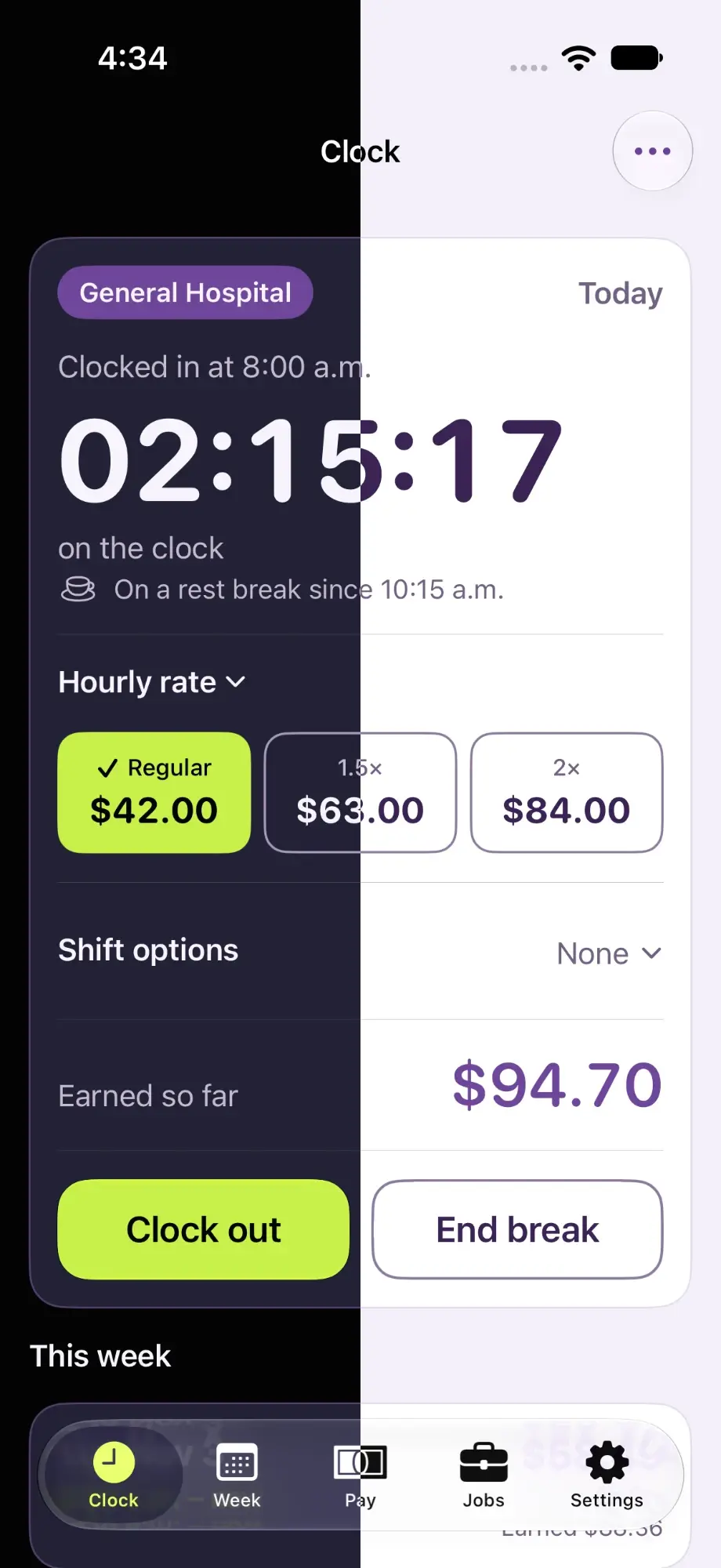
Live clock
Watch hours and earnings climb as you work, and see the rate change when overtime kicks in.
Week view
Every shift, its hours and estimated take-home, and exactly how each day was paid.
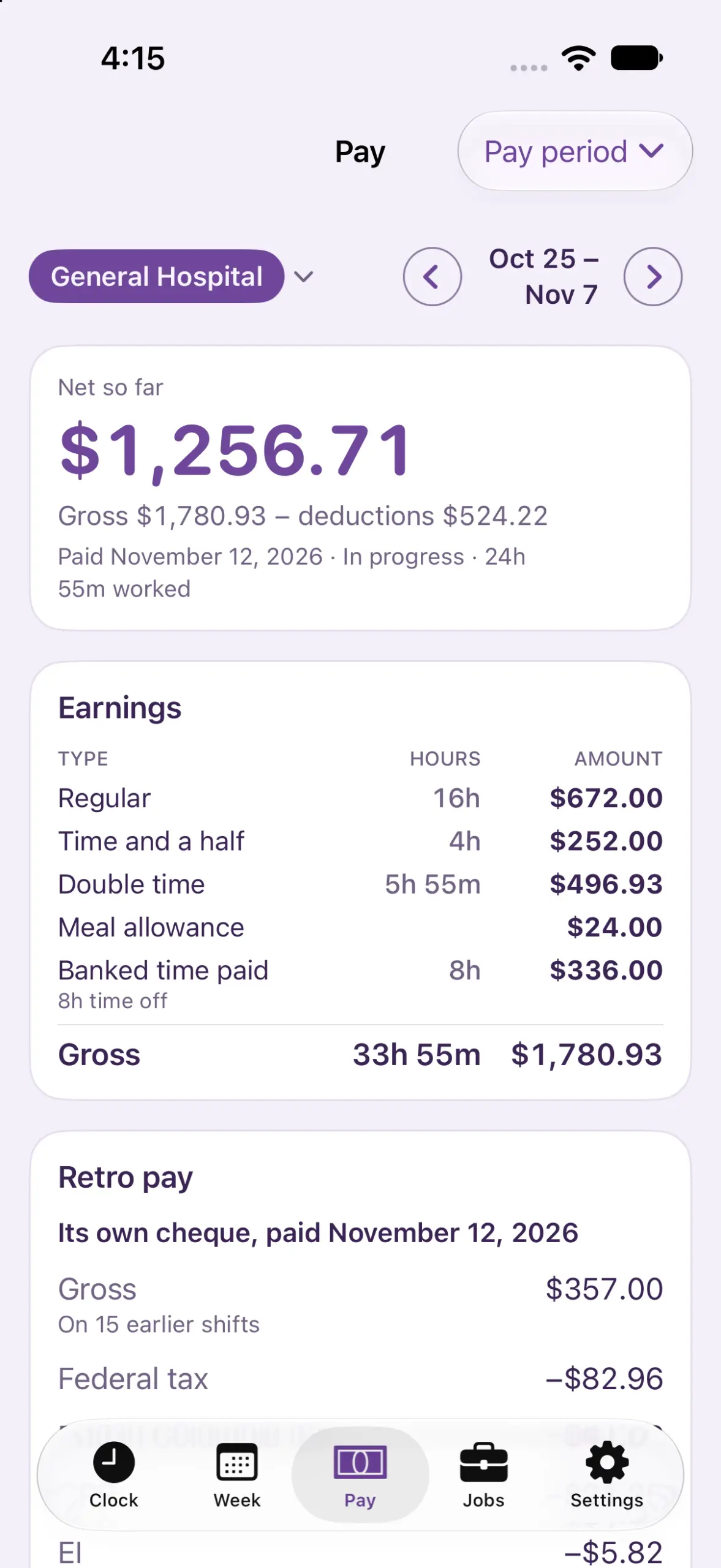
Pay view
Your next cheque: gross pay, every deduction, and the net estimate.
CPP and EI tracker
How close you are to this year's maximums, and why later cheques get bigger.
Banked time
Overtime saved as time off, tracked by rate, with a running balance.
Raises and retro pay
Enter a raise, even a backdated one, and the back pay shows on the right cheque.
Built by a shift worker who needed it.
Why it exists
I've driven a concrete mixer in BC for 19 years. My contract pays double time on Sundays, counts midnight to 6 a.m. as overtime, adds meal premiums on long shifts and banks overtime. None of the apps I tried knew any of that, so I built one that does.

Your pay stays on your phone.
No account, no sign-up, no ads and no tracking in the app. Your shifts and pay stay on your iPhone. The only copy anywhere else is a backup in your own iCloud, if you turn it on.
What you won't find in the app
- An account
- A sign-up
- Ads
- Tracking
Free to start. Pro when you want to set up your own rules.
Try every Pro feature free for 21 days. Nothing to pay, nothing renews.
Free
$0
One job on your province's rules, tax estimates, your full history, and export of the current pay period.
Pro
$29.99a year, or $3.99 a month
Your own pay rules, sharing them with your crew, unlimited jobs, cheque comparison, the Home Screen widget and Live Activity, and full export.
Founding Lifetime
$29.99once
Everything in Pro, paid once. For the first 100 buyers, then it's gone.
Know your cheque before payday.
Join the waitlist and you'll hear the day Paycheq lands on the App Store, so you have the best shot at one of 100 Founding Lifetime spots at $29.99.
iPhone only. Every province and territory.